
Push notifications
app.push sends notifications to your users' phones and browsers. Apps register a device token once, and your code sends to a user, not to tokens.
In development nothing leaves your machine. Every notification lands in the devtools Push panel, drawn the way an iPhone, an Android phone and a desktop browser would show it, next to the exact payload Apple, Google, Expo and the browser receive. Simulated devices answer like real phones that are offline, muted or uninstalled, so you see what your app does in the cases that usually only show up in production. When you are ready, add a transport block and the same code delivers for real.
To send one notification to the inbox, the phone and the mailbox at once, with per-user preferences and quiet hours, use the notifications block on top of app.push.
Send a notification#
// app/resources/order/order.routes.js
r.post('/:id/ship', { policy: 'admin' }, async (ctx) => {
  const order = await ctx.service.update(ctx.params.id, { status: 'shipped' }, ctx);
  await ctx.push.send({
    to: order.customer,                  // a user id: every device they registered
    title: 'Your order shipped',
    body: 'It arrives Thursday between 9 and 12.',
    url: `/orders/${order.id}`,          // opened on tap, also sent as data.url
    data: { orderId: String(order.id) },
  });
  return order;
});
ctx.push is available in routes and services, app.push everywhere else (jobs get { app }, plugins get calm.push).
send() resolves to { id, status, devices, results }:
status | Meaning |
|---|---|
captured | Recorded in devtools (and t.pushes in tests), not delivered: development or tests without a transport |
sent | Accepted for every device: by the transport, or by the simulator for simulated devices |
partial | Some devices failed. The delivery log in devtools says which and why. |
failed | No device received it, or there is no transport in production |
no-devices | The user has no registered devices |
An invalid message throws a 422 with the field errors, like any other validation error. Delivery problems never throw: a push should not fail the request that triggered it. They are in the result, the log and devtools.
Who receives it#
| Option | Sends to |
|---|---|
to | A user id (or an array of them): every device those users registered |
deviceIds | Specific devices by id |
tokens | Raw device tokens, with platform (ios, android or web, default android). Use this when you keep tokens yourself. |
The message#
| Field | Type | Notes |
|---|---|---|
title | string, up to 250 | About 36 characters show on an iPhone, 40 on Android, 45 in a browser |
subtitle | string | iPhone only, under the title |
body | string, up to 2000 | About 4 lines on an iPhone, one line (46 characters) on a collapsed Android notification |
image | https URL | A picture in the expanded notification. iOS needs a notification service extension in the app. |
icon | https URL | Browser notifications |
url | string | Where a tap should go (/orders/42 or myapp://orders/42), added to data.url |
badge | integer, 0 or more | The number on the iPhone app icon |
sound | string or false | default unless the message is silent. false for none. |
channel | string | Android notification channel id |
category | string | iOS category, for notification actions |
group | string | iOS thread: notifications with the same group are stacked together |
collapseId | string, up to 64 | A newer notification with the same id replaces the older one on the device (APNs apns-collapse-id, FCM collapse_key and tag, Expo collapseId and tag, Web Push tag) |
priority | high or normal | high (default) is shown right away, normal may wait to save battery |
ttl | seconds | How long the provider keeps trying an offline device |
silent | boolean | No banner and no sound: the app wakes in the background with data, which is then required |
data | object | Delivered to the app, never shown. FCM only carries strings, so other values are sent as JSON text. |
A message needs a title or a body, or silent: true with data.
Payloads are limited to 4 KB by every provider. Devtools shows the size of each one and warns before a provider would reject it.
Registering devices#
Apps register their push token after sign in, with the user's session:
| Endpoint | Body | Returns |
|---|---|---|
POST /api/auth/devices | { token, platform, name?, appVersion?, locale? } | 201 { data: device } |
GET /api/auth/devices | 200 { data: [device...] }, your devices | |
DELETE /api/auth/devices/:deviceId | 204 | |
POST /api/auth/devices/unregister | { token } | 204, turns notifications off for the device holding that token |
POST /api/auth/devices/opened | { pushId?, data? } | 204, reports that the user tapped a notification (emits push.opened) |
platform is ios, android or web. Tokens are never returned in full (a3f9c2…b7d3f8). Registering a token that is already known moves it to the current user and session, which is what you want when someone signs out and another person signs in on the same phone. Tokens starting with sim_ are reserved for simulated devices (422).
Apps know their own token, not the device id, so a "notifications" switch in the app's settings calls POST /api/auth/devices/unregister with the token to turn them off, and POST /api/auth/devices to turn them back on.
With Expo:
import * as Notifications from 'expo-notifications';
import { Platform } from 'react-native';

const { data: token } = await Notifications.getExpoPushTokenAsync({ projectId });
await fetch(`${API_URL}/api/auth/devices`, {
  method: 'POST',
  headers: { authorization: `Bearer ${session}`, 'content-type': 'application/json' },
  body: JSON.stringify({ token, platform: Platform.OS === 'ios' ? 'ios' : 'android' }),
});
With Firebase (Android, iOS or the web), send the token from getToken() the same way.
Devices are stored in the calm_devices collection. They are not a resource, so there are no CRUD routes for them beyond the ones above, and tokens never appear in other API responses. When a provider says a token stopped working (the app was uninstalled), the device is removed for you.
Devices follow sessions#
A device belongs to the session that registered it. When that session ends, the phone stops getting notifications, so nobody keeps receiving someone else's notifications after they signed out:
- Signing out (
/auth/logout), signing out everywhere, revoking a session, a password change (other sessions end) and a password reset remove the devices of those sessions. - Devices of sessions that expired are skipped and removed the next time you send to them. The delivery log says so.
GET /api/auth/devicesshowssignedIn: truefor devices bound to a session.
There is nothing to call on sign out. Devices registered with another credential (an API key) are not bound to a session and stay until they are removed. config.auth.devicesFollowSessions (default true) controls the removal at sign out.
In development: the Push panel#
Open Push in devtools. For every notification:
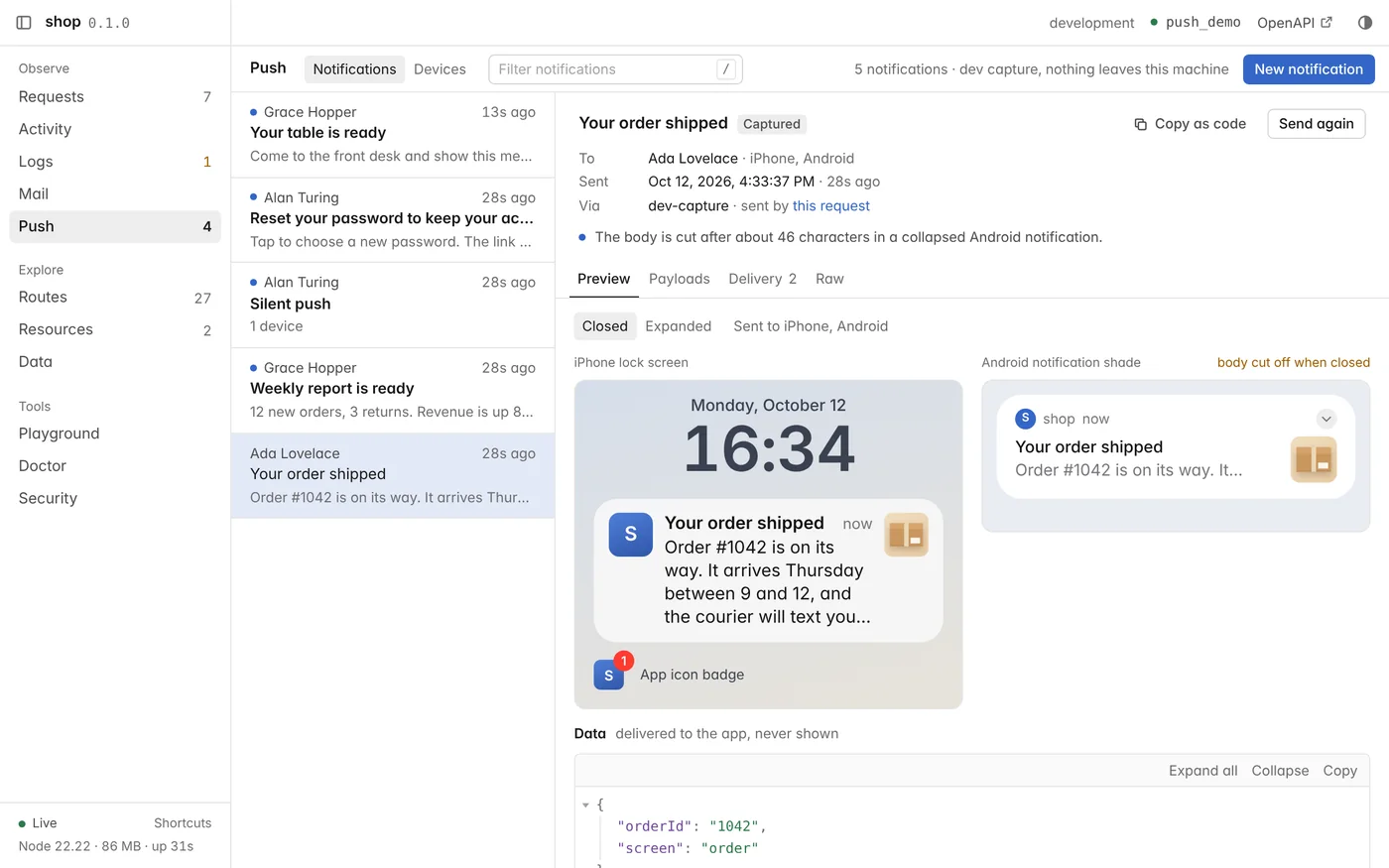
- Preview: the iPhone lock screen, the Android notification shade and a desktop browser notification, closed or expanded, at real device widths and type sizes, so text cuts off where a phone cuts it.
- Payloads: the exact JSON for APNs, FCM, Expo and Web Push, with its size against the 4 KB limit.
- Warnings: a title or body that will be cut off, data that looks sensitive (
password,token,secret...), non-string data for FCM, payloads a provider would reject. - Delivery: what happened on each device, step by step: which transport took it (or the simulator), the provider's answer, the receipt that came later, whether it was shown on the lock screen, and a link to the request that sent it.
New notification composes one with a live preview and sends it through the same app.push.send() your code uses. Send again reopens a sent one in the composer, and Copy as code gives you the ctx.push.send() call for it.
Agents see the same notifications with the calm_pushes tool.
Simulated devices#
No phone yet, or no phone that is offline right now? Devices (in the Push panel) adds devices to any user, as many as you like: an iPhone, an Android phone and a browser, each with its own behavior. A simulated device answers like a real phone would, and is never sent to a real provider, even when a transport is installed. In production, simulated devices are skipped.
| Behavior | What happens |
|---|---|
| Delivers | Accepted, then shown on the device's lock screen |
| Offline | Accepted, and shown when the device comes back online (Bring online) |
| Notifications off | Accepted and never shown. Providers cannot tell, and neither can your server. |
| App uninstalled | The provider answers DeviceNotRegistered: the device is removed |
| Invalid token | The provider answers InvalidRegistration (malformed, or replaced by a new token): the device is removed |
| Rate limited | The provider answers MessageRateExceeded: too many notifications to this device |
Change a device's behavior at any time from its row. Each device can also:
- Send test: send it a notification right from devtools.
- Rotate its token: the provider gives the app a new token and the old one stops working. The app registers the new one, and the old device fails once on the next send and is removed, just as your server would find out in production.
- Uninstall app: the next send fails with
DeviceNotRegisteredand removes the device. - Remove: unregister it, as the app would when the user turns notifications off.
Click a simulated device to open it as a phone: its own lock screen with every notification it received, newest first, and which ones are waiting (offline) or hidden (notifications off). Bring online shows the waiting ones, Clear empties the lock screen, and tapping a notification opens it: the app "goes to" its url, and push.opened is emitted with { id, device, url, data }, the event your app would report. The lock screen follows new notifications live, so keep it open while you trigger them from your app.
Your own phone#
To try a real device in development, install a transport block, then either let your app register its token, or paste the token in devtools: Devices, Add device, Real token (for example the Expo push token your app logs). Real devices go through the transport and arrive on your phone. Their rows show which transport each one goes through.
Delivering for real#
Add the block that matches how your app receives notifications:
| Block | Use it for |
|---|---|
push-expo | Expo and React Native apps using expo-notifications |
push-fcm | Native Android and iOS apps and web apps using the Firebase SDK (iOS goes through FCM's APNs integration) |
npx calm add push-expo
npx calm add push-fcm      # both, if some devices register Expo tokens and others native ones
Several transports can be active at once. Each device goes to the transport that takes its token: push-expo takes Expo push tokens, push-fcm the native ones, so one send() reaches both kinds of apps.
With a transport installed:
- Development delivers to real tokens, so you can test on your own phone. Simulated devices stay in devtools.
- Tests keep capturing notifications in
t.pushesand never call the provider. - Production delivers, removes tokens the provider reports as gone, and logs failures.
In production without a transport, nothing is sent: send() returns failed and an error is logged.
Your own transport#
A transport is an object with a name, a send(message, devices, { id }) method that returns one result per device, and optionally accepts(device) to take only the tokens it understands:
import { definePlugin, providerPayloads } from '#calm';

export default definePlugin({
  name: 'push-onesignal',
  setup(calm) {
    calm.push.use({
      name: 'onesignal',
      accepts: (device) => device.token.startsWith('onesignal:'),
      async send(message, devices) {
        return Promise.all(devices.map(async (device) => {
          const payload = providerPayloads(message, device.token).fcm.payload; // or apns, expo, web
          // deliver it ...
          return { ok: true, id: 'provider-message-id' };
          // or { ok: false, error: 'reason', unregistered: true } to remove the device
        }));
      },
    });
  },
});
devices holds { id, user, token, platform, name } for real devices only. providerPayloads() builds the same payloads devtools shows. A device goes to the first transport whose accepts() says yes, otherwise to a transport without accepts(). Import from #calm only: providerPayloads and maskToken are exported there.
When the provider reports later (a receipt), call app.push.receipt(pushId, deviceId, { ok, error, unregistered, transport }) with the id your send() received. It lands in the same delivery log, removes the device when unregistered is true, and emits push.receipt.
Testing#
Notifications are captured in tests, with everything devtools shows:
test('shipping an order notifies the customer', async () => {
  const customer = await t.signup();
  await t.post('/auth/devices', { token: 'test-token-1', platform: 'ios' }, customer);
  const order = await createOrder(customer);

  await t.post(`/orders/${order.id}/ship`, {}, admin);

  const push = t.pushes.at(-1);
  assert.equal(push.message.title, 'Your order shipped');
  assert.equal(push.devices[0].platform, 'ios');
  assert.deepEqual(push.warnings.filter((w) => w.level !== 'info'), []);
});
Each record has message, devices (tokens masked), payloads, warnings, status and log.
Simulated devices work in tests too, and answer at once. Create one directly to see what your code does when a phone was uninstalled:
test('an uninstalled app removes the device', async () => {
  const user = await t.signup();
  await t.app.push.devices.create({ user: user.id, platform: 'ios', token: 'sim_ios_test1', simulated: true, behavior: 'uninstalled' });

  const res = await t.app.push.send({ to: user.id, title: 'Hello' });
  assert.equal(res.status, 'failed');
  assert.equal(await t.app.push.devices.countDocuments({ user: user.id }), 0);
});Events#
| Event | When | Payload |
|---|---|---|
push.sent | A send finished with any status but failed | { id, status, devices } |
push.failed | No device received it | { id, status, devices } |
push.receipt | A provider reported later (Expo receipts, the simulator) | { id, device, ok, error, unregistered } |
push.opened | The app reported a tap (POST /api/auth/devices/opened), or a notification was tapped on a simulated phone | { id, user, device, url, data, simulated }. data comes from the client: only act on the user's own records |
push.simulated | A simulated device showed a notification, kept it waiting (offline) or hid it (notifications off) | { id, device, state } |
Use them for metrics or an audit trail:
calm.on('push.failed', ({ id, devices }) => calm.log.warn('Push failed', { id, devices }));Good practice#
- Send an id, not the content. Payloads travel through Apple, Google or a browser vendor and are shown on a lock screen. Put
{ orderId }indataand let the app fetch the details from your API. Devtools warns about keys that look sensitive. - Lead with the point. A closed Android notification shows one line of the body.
- Send to many users from a job, not from the request.
- Let people turn notifications off: per device with
POST /api/auth/devices/unregister, or per type and with quiet hours through the notifications block's preferences.