
Understanding the CalmAPI Architecture
Learn how CalmAPI organizes code for maximum clarity and maintainability.
The Big Picture#
CalmAPI follows a layered architecture pattern. Think of it like a restaurant:
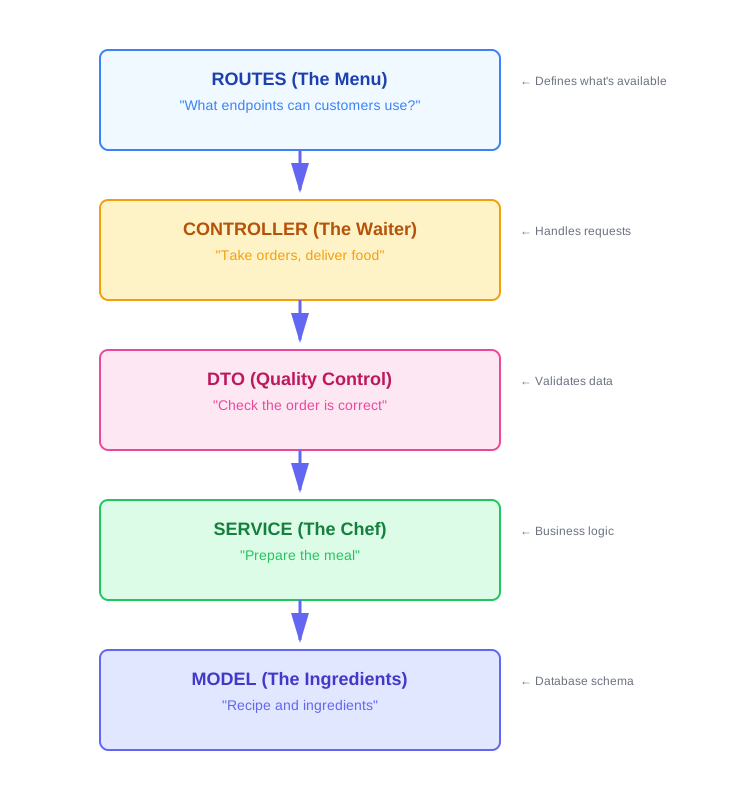 #
#
Module Structure#
Every CalmAPI module has 6 files. Let's use post as an example:
src/modules/post/
├── post.route.js       # 1. Defines API endpoints
├── post.controller.js  # 2. Handles HTTP requests
├── post.dto.js         # 3. Validates & transforms data
├── post.service.js     # 4. Business logic & DB operations
├── post.model.js       # 5. Database schema
└── post.settings.js    # 6. Module configuration
Flow of a Request#
Let's trace what happens when someone creates a post:
1. POST /api/posts (with JSON data)
         ↓
2. post.route.js → Receives request at endpoint
         ↓
3. post.controller.js → Calls insert() method
         ↓
4. post.dto.js → Validates data format (InsertDTO)
         ↓
5. post.service.js → Inserts into database
         ↓
6. post.model.js → Defines what fields to save
         ↓
7. post.dto.js → Formats response (GetDTO)
         ↓
8. post.controller.js → Sends response back
         ↓
9. User receives JSON response
File-by-File Breakdown#
1. Route File (*.route.js)#
Purpose: Define your API endpoints (the menu)
What it does:
- Maps URLs to controller methods
- Applies middleware (like authentication)
- Defines HTTP methods (GET, POST, PUT, DELETE)
Example:
// post.route.js
const express = require('express');
const router = express.Router();
const PostController = require('./post.controller');
const AuthController = require('../auth/auth.controller');

// Public routes
router.get('/', PostController.getAll);         // GET all posts
router.get('/:id', PostController.get);         // GET one post

// Protected routes (require login)
router.use(AuthController.checkLogin);          // Check auth for routes below

router.post('/', PostController.insert);        // CREATE post
router.put('/:id', PostController.update);      // UPDATE post
router.delete('/:id', PostController.delete);   // DELETE post

module.exports = router;
2. Controller File (*.controller.js)#
Purpose: Handle HTTP requests and responses (the waiter)
What it does:
- Receives requests from routes
- Calls service methods
- Handles errors
- Formats responses
Example:
// post.controller.js
const { CalmController } = require('../../../system/core/CalmController');
const { PostService } = require('./post.service');
const { Post } = require('./post.model');
const postDTO = require('./post.dto');
const autoBind = require('auto-bind');

const postService = new PostService(new Post().getInstance());

class PostController extends CalmController {
    constructor(service) {
        super(service);  // Inherit from CalmController
        this.dto = { ...this.dto, ...postDTO };  // Merge DTOs
        autoBind(this);  // Bind 'this' context
    }

    // Override getAll to add custom populate
    async getAll(req, res, next) {
        try {
            const response = await this.service.getAll(req.query, {
                populateFields: [
                    { path: 'createdBy', select: 'name email' }
                ]
            });
            res.sendCalmResponse(
                response.data.map(x => new this.dto.GetDTO(x)),
                { totalCount: response.total }
            );
        } catch (e) {
            next(e);
        }
    }
}

module.exports = new PostController(postService);
Key Points:
- Extends
CalmController(inherits common methods) - Can override methods for custom behavior
- Uses
super()to call parent class methods autoBind(this)ensuresthisworks correctly in async functions
3. DTO File (*.dto.js)#
Purpose: Validate input and format output (quality control)
What it does:
- InsertDTO: Validates data when creating
- UpdateDTO: Validates data when updating
- GetDTO: Formats data when retrieving
Example:
// post.dto.js
class GetDTO {
    constructor({ ...props }) {
        this._id = props._id;
        this.title = props.title;
        this.content = props.content;
        this.slug = props.slug;
        this.createdBy = props.createdBy;
        this.createdAt = props.createdAt;
        this.updatedAt = props.updatedAt;
        Object.freeze(this);  // Make immutable
    }
}

class InsertDTO {
    constructor({ ...props }) {
        this.title = props.title;
        this.content = props.content;
        this.createdBy = props.createdBy;
        Object.freeze(this);
    }
}

class UpdateDTO {
    constructor({ ...props }) {
        this.title = props.title;
        this.content = props.content;
        this.updatedBy = props.updatedBy;

        // Remove undefined fields
        Object.keys(this).forEach(key => {
            if (this[key] === undefined) {
                delete this[key];
            }
        });
        Object.freeze(this);
    }
}

module.exports = { GetDTO, InsertDTO, UpdateDTO };
Why DTOs?
- ✅ Prevent sending sensitive data (like passwords)
- ✅ Ensure only valid fields are saved
- ✅ Consistent response format
- ✅ Easy to add validation logic
4. Service File (*.service.js)#
Purpose: Business logic and database operations (the chef)
What it does:
- Talks to the database
- Implements business rules
- Handles data transformation
Example:
// post.service.js
const { CalmService } = require('../../../system/core/CalmService');

class PostService extends CalmService {
    // Global populate settings
    populateFields = [
        { path: 'createdBy' },
        { path: 'updatedBy' }
    ];

    constructor(model) {
        super(model);  // Inherit from CalmService
    }

    // Add custom methods here
    async getPostsByAuthor(authorId) {
        return await this.model.find({ createdBy: authorId });
    }
}

module.exports = { PostService };
Key Points:
- Extends
CalmService(inherits CRUD methods) populateFieldsautomatically loads related data- Add custom business logic methods here
5. Model File (*.model.js)#
Purpose: Define database schema (the recipe)
What it does:
- Defines fields and types
- Sets validation rules
- Adds database hooks (pre-save, etc.)
Example:
// post.model.js
const mongoose = require('mongoose');
const { Schema } = mongoose;

class Post {
    initSchema() {
        const schema = new Schema({
            title: {
                type: String,
                required: true,
            },
            slug: String,
            content: {
                type: String,
                required: true,
            },
            createdBy: {
                type: Schema.Types.ObjectId,
                ref: 'user'
            },
            updatedBy: {
                type: Schema.Types.ObjectId,
                ref: 'user'
            }
        }, { timestamps: true });

        // Pre-save hook
        schema.pre('save', function(next) {
            if (!this.isModified('title')) return next();
            this.slug = slugify(this.title);
            next();
        });
        try{
            mongoose.model('post', schema);
        } catch(e) {

        }

    }

    getInstance() {
        this.initSchema();
        return mongoose.model('post');
    }
}

module.exports = { Post };
6. Settings File (*.settings.js)#
Purpose: Module configuration
What it does:
- Custom route path
- Module-specific settings
Example:
// post.settings.js
module.exports = {
    moduleRoute: 'blog-posts'  // Custom path: /api/blog-posts
};
The Power of Inheritance#
CalmAPI uses Object-Oriented Programming to reduce code duplication.
CalmController Base Class#
Located in system/core/CalmController.js, it provides:
class CalmController {
    async getAll(req, res, next) { ... }    // GET all items
    async get(req, res, next) { ... }       // GET one item
    async insert(req, res, next) { ... }    // CREATE item
    async update(req, res, next) { ... }    // UPDATE item
    async delete(req, res, next) { ... }    // DELETE item
}
You get all these methods for FREE!
When you extend CalmController:
class PostController extends CalmController {
    // You automatically have: getAll, get, insert, update, delete

    // Override if you need custom behavior
    async getAll(req, res, next) {
        // Custom logic here
        return super.getAll(req, res, next);  // Call parent method
    }
}
CalmService Base Class#
Located in system/core/CalmService.js, it provides:
class CalmService {
    async getAll(query, options) { ... }    // Query with filters
    async get(id, options) { ... }          // Get by ID
    async insert(data) { ... }              // Create
    async update(id, data) { ... }          // Update
    async delete(id) { ... }                // Delete
}
Data Flow Visualization#
Creating a Post#
Client
  │
  ├─ POST /api/posts
  │  Body: { title: "Hello", content: "World" }
  │
  ▼
post.route.js
  │
  ├─ router.post('/', PostController.insert)
  │
  ▼
post.controller.js
  │
  ├─ async insert(req, res, next) {
  │    // Add createdBy from logged-in user
  │    req.body.createdBy = req.user._id;
  │
  ▼
post.dto.js (InsertDTO)
  │
  ├─ new InsertDTO(req.body)
  │  // Only allows: title, content, createdBy
  │
  ▼
post.service.js
  │
  ├─ async insert(data) {
  │    return await this.model.create(data);
  │
  ▼
post.model.js
  │
  ├─ Validates against schema
  │  Runs pre-save hooks (generates slug)
  │  Saves to MongoDB
  │
  ▼
Database
  │
  ├─ Saves document
  │
  ▼
post.service.js
  │
  ├─ Returns saved data
  │
  ▼
post.dto.js (GetDTO)
  │
  ├─ new GetDTO(savedData)
  │  // Formats response
  │
  ▼
post.controller.js
  │
  ├─ res.sendCalmResponse(formattedData)
  │
  ▼
Client
  │
  └─ Receives: { status: true, data: {...} }
Key Concepts Summary#
1. Separation of Concerns#
Each file has ONE job:
- Routes → URL mapping
- Controller → Request handling
- DTO → Data validation
- Service → Business logic
- Model → Database schema
2. Inheritance#
Use super() to:
- Call parent class methods
- Extend functionality without rewriting
3. Auto-binding#
autoBind(this) ensures this context is correct in async functions.
4. DTOs for Safety#
Always validate input and format output through DTOs.
5. Populate for Relations#
Load related data automatically with populateFields.
Common Patterns#
Pattern 1: Use Parent Methods#
class ProductController extends CalmController {
    // No code needed! Uses parent's insert method
}
Pattern 2: Extend Parent Methods#
class ProductController extends CalmController {
    async insert(req, res, next) {
        // Add custom logic
        console.log('Creating product...');

        // Call parent method
        return super.insert(req, res, next);
    }
}
Pattern 3: Completely Custom Methods#
class ProductController extends CalmController {
    async getFeatured(req, res, next) {
        try {
            const products = await this.service.model.find({ featured: true });
            res.sendCalmResponse(products);
        } catch (e) {
            next(e);
        }
    }
}
What's Next?#
Now you understand the architecture! Let's create your first custom module.